
If you are looking for instructions on how to deposit using JazzCash or Easypaisa in JJJ PK Game, this guide explains the general process step by step.
This article is written for informational purposes to help users understand the deposit procedure and basic safety considerations when using mobile wallet services. For a full breakdown of JJJ PK Game features, safety, and updates, check [JJJPK Game Complete Guide] on our homepage.
Before proceeding, make sure you are familiar with the app’s policies and terms.
What You Need Before Making a Deposit
Before starting the deposit process, ensure:
- You have a verified JazzCash or Easypaisa account
- Your mobile wallet has sufficient balance
- Your JJJPK Game account is active
- Your internet connection is stable
Always use your own registered mobile wallet account.
How to Deposit via JazzCash in JJJ PK Game
Follow these steps carefully:
Step 1: Open the Application
Launch the JJJPK Game app and log in to your account.
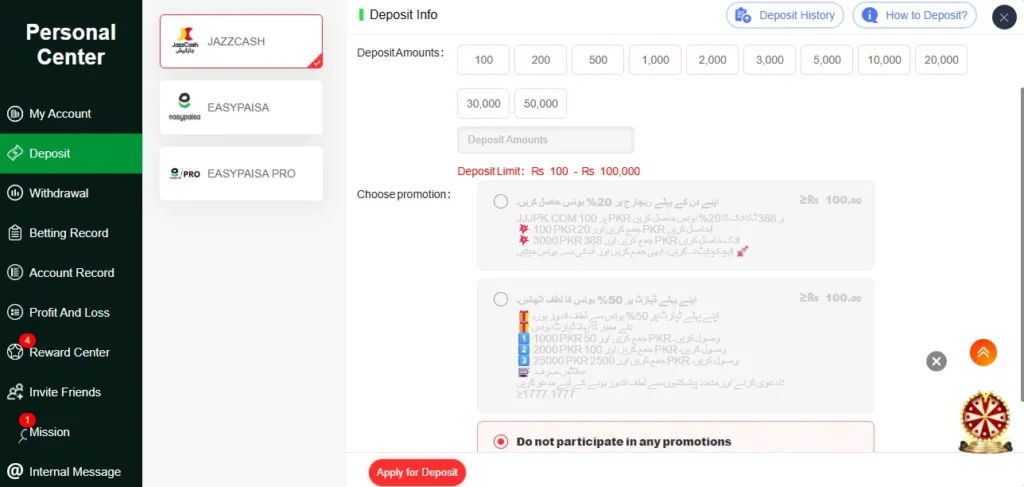
Step 2: Go to the Deposit Section
Navigate to the Wallet or Deposit section from the dashboard.
Tap on Deposit.
Step 3: Select JazzCash as Payment Method
From the available options, choose JazzCash.
Step 4: Enter Deposit Amount
Input the amount you wish to transfer.
Make sure the amount meets the minimum deposit requirement displayed in the app.
Step 5: Enter Your JazzCash Number
Provide your registered JazzCash mobile number.
Double-check the number before proceeding.
Step 6: Confirm the Transaction
You may receive:
- An SMS confirmation
- A JazzCash app approval request
Approve the transaction from your JazzCash account.
Step 7: Wait for Processing
Processing time may vary depending on system activity.
If the transaction is successful, the balance should reflect in your app wallet.
How to Deposit via Easypaisa in JJJ PK Game
The process is similar. Follow these steps:
Step 1: Log in to the App
Open the JJJPK Game app and access the Deposit section.
Step 2: Select Easypaisa
Choose Easypaisa as your preferred payment method.
Step 3: Enter Deposit Amount
Input your desired amount within the allowed limits.
Step 4: Provide Easypaisa Mobile Number
Enter your registered Easypaisa account number.
Ensure it is correct to avoid transaction failure.
Step 5: Confirm via Easypaisa
You may receive a confirmation message or request inside your Easypaisa app.
Approve the transaction to complete the process.
Important Safety Tips Before Depositing
When using mobile wallets:
- Only use accounts registered in your name
- Never share OTP or verification codes
- Verify the recipient details carefully
- Keep screenshots of transaction confirmation
- Avoid using public Wi-Fi during financial transactions
Always review the platform’s terms before transferring funds.
Common Deposit Issues and Solutions
Transaction Not Reflected
- Wait a few minutes
- Refresh the app
- Check wallet transaction history
Payment Failed
- Confirm sufficient balance
- Check network connection
- Ensure mobile number is correct
Incorrect Number Entered
Contact platform support immediately if a mistake occurs.
Frequently Asked Questions on Depositing Money in JJJ PK Game
What is the minimum deposit amount?
Minimum deposit limits are displayed within the app and may change over time.
How long does deposit processing take?
Processing time varies depending on system load and wallet provider.
Is depositing through JazzCash or Easypaisa secure?
Security depends on using verified accounts and following safe transaction practices.
Can I cancel a deposit after confirming?
Once confirmed through your wallet provider, transactions may not be reversible. Always verify details before approving.
Final Disclaimer: This guide is provided for informational purposes only. JJJPKGame.org is an independent informational website and is not affiliated with, endorsed by, or officially connected to the developers or owners of JJJPK Game. All trademarks, mobile wallet names, and brand identities belong to their respective owners.
Users are responsible for reviewing official policies and understanding financial risks before performing transactions.